
What the email looks like
The subject is some variation of "invited you to view a folder" or "shared a file with you". There's no dodgy grammar and no unfamiliar sender. In the case we handled it came from a supplier the practice dealt with regularly, because the attacker was sitting inside that supplier's mailbox and could see exactly how they normally wrote.
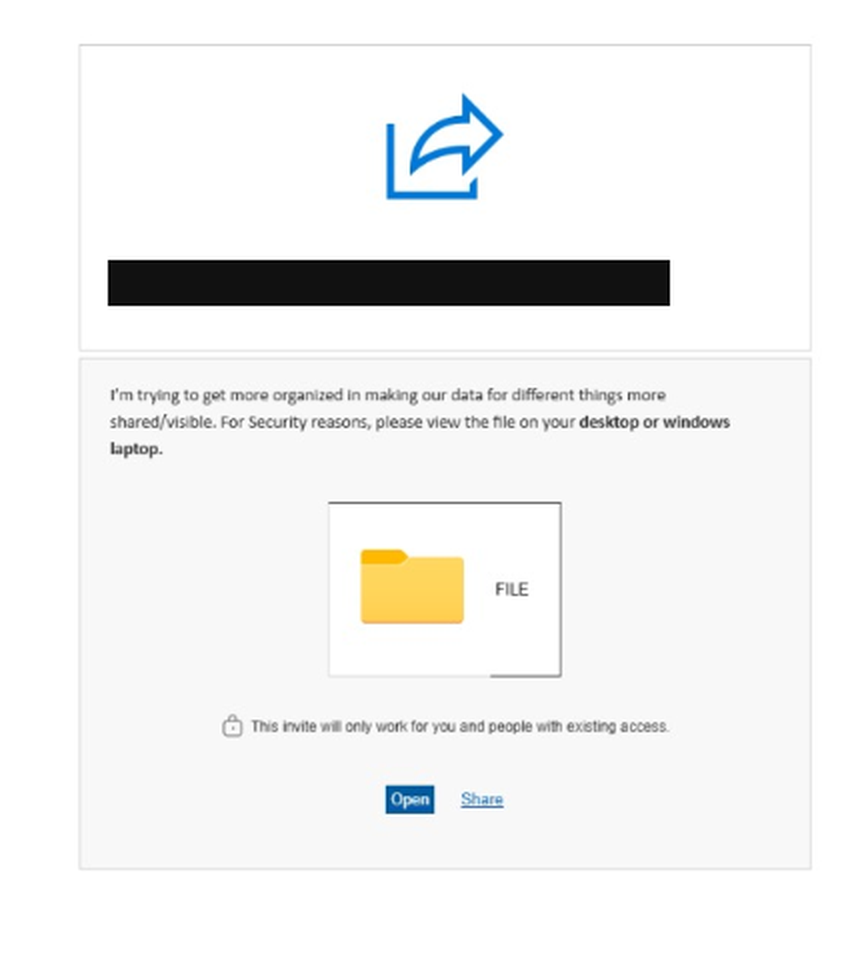
The body is deliberately mundane. One we were shown recently read: "I'm trying to get more organized in making our data for different things more shared/visible." Vague enough to fit almost any working relationship, specific enough to sound like a person. Underneath sits a generic folder icon, an Open button, and a line reassuring you the invite only works for you and people with existing access.
That's the whole trick. Every instinct staff are trained on, checking the sender, looking for odd phrasing, being wary of strangers, gives the right answer here. The sender is genuine. The account has just stopped belonging to its owner.
The line that gives it away
There's one tell in that message worth knowing, because it appears again and again: "For security reasons, please view the file on your desktop or windows laptop."
Read as a security instruction it sounds responsible. It's the opposite. The payload only runs on Windows, so the attacker needs you off your phone and onto a machine they can actually infect. Anyone opening it on an iPhone would see nothing happen and might get suspicious. A legitimate file share doesn't care what device you're on.
If an email tells you which device to open something on, that's not caution. That's the attacker choosing their ground.
What happens if someone clicks
The link leads to a download rather than a document. There's no installer to walk through and nothing that announces itself as software. One confirmation prompt appears, and whoever is clicking has already decided to open a file, so they click it. The install then runs in the background.
Nothing visible happens next. No window opens, no document appears, no error is shown. From the user's side it looks like a link that failed to work, which is exactly why it goes unreported. By the time anyone mentions it, the machine has been accessible for hours.
What gets installed is usually ScreenConnect, a legitimate remote support tool that IT providers use every day. It's properly signed, widely deployed, and doesn't look like malware to most security software, which is exactly why it was chosen.
Once it runs, whoever is on the other end has the same access a technician would: the file system, saved credentials, anything the logged-in user can reach. Recent versions of this attack install the agent under a name like "Windows Security" and configure it so it can't easily be viewed or removed, even by an administrator.
Then it does the same thing again
This is the part worth understanding, and the reason it spreads the way it does. With mailbox access, the attacker harvests the contact list and sends the same file-share email onward, from the real account, into real conversation threads.
We watched both ends of that. The email arrived from a compromised supplier. Once the reception machine was taken, the same message went out again from our client, to the businesses they deal with and to their patients. Two hops of a chain that has no reason to stop, each one carrying the name of an organisation the next recipient trusts.
That second group is the one that should worry any healthcare practice. A supplier receiving a suspicious file share might have someone who checks. A patient receiving an email from their clinic has no reason to doubt it and no IT department to ask. They're the least protected people in the chain and the most likely to click.
Worth being precise about what was taken here. This wasn't a patient records system being breached. It was the mailbox: an unauthorised party had access to Outlook and pulled email addresses out of it, and some of those addresses belonged to patients. Whether that reaches the threshold for a notifiable data breach is a judgement for the practice and their advisers, not for us. But it's a question worth asking early rather than discovering weeks later, and the clinic we wrote about in July shows how badly that goes when it's left too long.
On that machine, the harvesting wasn't even improvised. Sitting in ScreenConnect's own file-transfer folder was a purpose-built application called "Email Extractor Outlook", pushed down the remote session and run against the local Outlook profile. The address book was the objective, not an afterthought.
Security vendors reporting on these campaigns describe attackers studying communication patterns and targeting the people most likely to act, which is why the messages so often land on someone in accounts or reception rather than at random.
For a clinic or a professional practice, the damage runs past the technical. Your suppliers, your referrers and the people you care for all receive malicious email carrying your name on it, and the ones who trust you most are the ones most likely to click.
What it actually looks like on the machine
A few details from that rebuild, because they're worth recognising:
There was more than one. At least two separate ScreenConnect clients, each with its own identifier, installed roughly a minute apart. Removing one would have left the other running, and there's no guarantee two was the whole of it. Redundant access is deliberate, and it's a documented pattern in these campaigns.
Killing the process does nothing. End it in Task Manager and it restarts on its own, within seconds. It's running as a Windows service, so the service control manager simply starts it again. Anyone trying to deal with this through Task Manager will conclude their computer is possessed, and give up.
It installs like real software. Both sat in Program Files alongside genuine applications, with proper file structures and signed components. Nothing about a folder listing looks wrong.
It has to be stopped as a service. Setting the service to Disabled and stopping it was the only thing that held. There was no clean uninstall, and newer variants go further, disguising the service name and locking permissions so an administrator can't remove it at all.
The machine had mapped drives. It was a reception workstation with access to shared storage. Whoever was on the other end had that access too. There was no encryption in this case, which was luck rather than restraint, and the machine was rebuilt from scratch rather than cleaned.
That last point is the one to sit with. The compromised computer is rarely the target. It is the route to everything it can reach.
What actually stops it
It's worth being precise here, because the obvious answer is the wrong one. Multi-factor authentication does not stop this. Nobody logs into the mailbox. The attacker is already on the machine, inside an Outlook session that's open and authenticated, operating as the person sitting at that desk. No login happens, so no second factor is ever asked for. MFA is still worth having for other reasons, but it wouldn't have prevented what happened here.
Stop the install. This is the one that matters. The entire chain depends on a user being able to run an installer. Take that away and the click leads nowhere. Standard user accounts without local administrator rights, and application control that only permits approved software to execute, are what break this attack.
Block or alert on remote access tools. ScreenConnect, AnyDesk, TeamViewer and similar are legitimate software, which is exactly why they're used. If they aren't part of your environment, they should be blocked outright. If they are, you should know immediately when a new instance appears that nobody deployed.
Limit what the machine can reach. The reception workstation had mapped drives to shared storage, so the attacker inherited that access. Access should follow the job, not the convenience of having everything mapped everywhere.
Tell staff the two specific tells. A file-share link from a familiar contact is worth a phone call before it's worth a click. And any message instructing you which device to open it on should be treated as hostile until proven otherwise.
If one of these has already been opened on a machine in your practice, disconnect it from the network and call us. The two questions that matter are what that computer could reach, and whether the same email has already gone out under your name.